Introduction
Online privacy is more important today than ever before. Every day, people send emails, store files, and share personal information using online services. Unfortunately, many email providers collect user data, display ads, and track online activities. If you want a secure and private email service, Proton Mail is one of the best choices. The Proton Mail Android app gives users a safe and easy way to manage emails from anywhere. Along with Proton Mail, you also get access to Proton Drive, a secure cloud storage service that keeps your files private. Whether you want to protect your emails or safely store important documents, Proton offers a complete privacy-focused solution. In this guide, you will learn everything about the Proton Mail Android App, Proton Drive, Proton Mail signup, features, benefits, pricing, and tips for using the app effectively.
What Is Proton Mail?
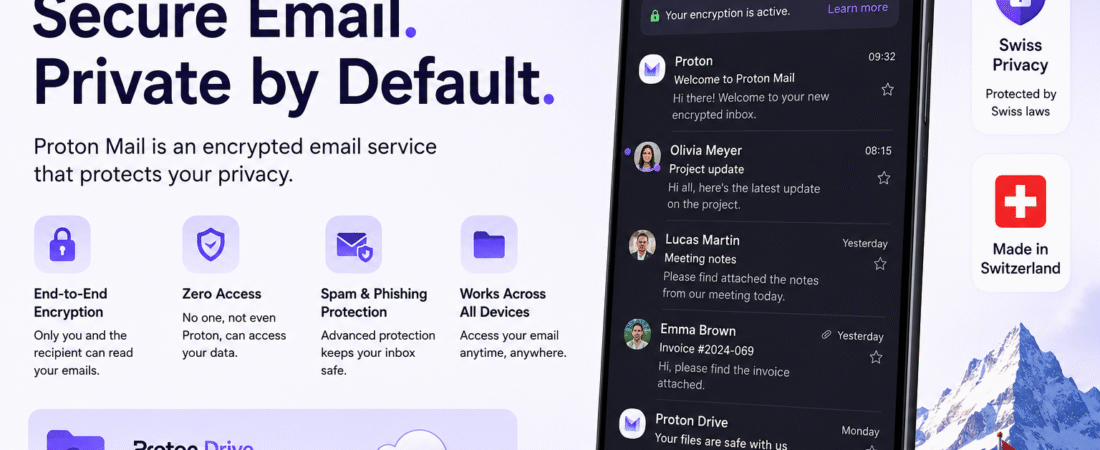
Proton Mail is an encrypted email service developed by Proton AG, a company based in Switzerland. It was created by scientists who wanted to give people better online privacy.
Unlike many free email providers, Proton Mail does not scan your emails for advertising purposes. All emails between Proton Mail users are protected with end-to-end encryption, meaning only the sender and receiver can read them.
Millions of users worldwide trust Proton Mail because it focuses on privacy, security, and ease of use.
Some popular Proton services include:
- Proton Mail
- Proton Drive
- Proton VPN
- Proton Calendar
- Proton Pass
All these services work together under one Proton account.
Proton Mail Android App Overview
The Proton Mail Android app allows you to access your secure inbox from your Android smartphone or tablet. The app has a modern interface that is easy to navigate, even for beginners.
Whether you’re checking emails at work, replying while traveling, or organizing your inbox at home, the Android app delivers a smooth and secure experience.
The application is regularly updated with new features and security improvements.
Main Features of the Proton Mail Android App
End-to-End Encryption
The biggest advantage of Proton Mail is its end-to-end encryption.
This means:
- Your emails are encrypted before leaving your device.
- Only the intended recipient can read the message.
- Even Proton cannot access your email content.
This provides strong protection against hackers, data leaks, and unauthorized access.
Zero Access Encryption
Proton uses zero-access encryption.
Your messages remain encrypted on Proton’s servers, meaning nobody—not even Proton employees—can read your private emails.
This level of security makes Proton Mail one of the safest email services available.
Clean and User-Friendly Interface
The Android app has a simple layout that is easy to understand.
Users can:
- Read emails
- Compose messages
- Organize folders
- Search conversations
- Archive messages
- Delete unwanted emails
- Mark messages as favorites
Everything is designed for quick access.
Push Notifications
Receive instant notifications whenever new emails arrive.
You can customize notifications for:
- Personal emails
- Work emails
- Multiple accounts
- Important contacts
This helps you stay updated without constantly opening the app.
Dark Mode
The Proton Mail Android app supports Dark Mode.
Benefits include:
- Less eye strain
- Better battery life on OLED screens
- Comfortable reading at night
- Modern appearance
You can switch between Light Mode and Dark Mode anytime.
Offline Access
Even without an internet connection, some previously synchronized emails remain available for reading.
This is useful while traveling or when your internet connection is unstable.
Email Organization Tools
Keeping your inbox clean is simple.
Features include:
- Labels
- Custom folders
- Filters
- Search function
- Archive
- Spam protection
- Trash management
These tools make email management much easier.
Security Features of Proton Mail
Security is the main reason many users choose Proton.
Here are the key protections included.
Strong Encryption
Every email is protected using advanced encryption standards trusted worldwide.
Sensitive information remains safe during transmission and storage.
Two-Factor Authentication
Users can enable Two-Factor Authentication (2FA).
This adds another layer of protection by requiring a verification code during login.
Even if someone knows your password, they cannot access your account without the second verification step.
Password-Protected Emails
You can send password-protected emails to users who do not have Proton Mail.
The recipient enters the password to open the encrypted message.
This feature is excellent for sending confidential documents.
Self-Destructing Emails
Proton Mail allows you to create emails that automatically disappear after a chosen period.
This helps protect sensitive information from remaining online permanently.
Spam and Phishing Protection
The app automatically detects suspicious emails and moves them to the Spam folder.
This reduces the risk of phishing attacks and malicious links.
Benefits of Using the Proton Mail Android App
Many users switch from Gmail or Outlook because of Proton’s privacy-first approach.
Here are the biggest benefits.
Better Privacy
Your personal information stays private.
No advertising tracking.
No email scanning.
No selling user data.
Easy to Use
Despite its advanced security, Proton Mail remains simple enough for beginners.
The Android app requires very little learning.
Fast Performance
The application loads quickly.
Emails sync efficiently.
Searching messages is smooth even in large inboxes.
Cross-Platform Support
One Proton account works across:
- Android
- iPhone
- Windows
- macOS
- Linux
- Web browser
Your emails remain synchronized everywhere.
Proton Drive: Secure Cloud Storage
Besides secure email, Proton also offers Proton Drive.
Proton Drive is a privacy-focused cloud storage platform that protects your files with end-to-end encryption.
Unlike traditional cloud storage providers, Proton Drive ensures that only you can access your stored files.
Even Proton cannot view your documents, photos, videos, or backups.
Main Features of Proton Drive
Secure File Storage
Upload files safely from your Android device.
Everything is encrypted before being stored.
Automatic Sync
Files stay synchronized across all your devices.
You can upload a document from your phone and access it later on your computer.
Secure Sharing
Need to share files?
Proton Drive lets you create secure sharing links.
You can also protect links with passwords and expiration dates for additional security.
Photo Backup
The Android app supports automatic photo backup.
Your important memories remain protected with encrypted storage.
Large File Support
Store documents, presentations, videos, PDFs, spreadsheets, and other large files securely.
This makes Proton Drive suitable for both personal and business use.
Proton Mail and Proton Drive Together
One of the biggest advantages of Proton is that all services work together.
You can:
- Send encrypted emails.
- Store important attachments securely.
- Share documents privately.
- Access everything with one Proton account.
This creates a complete privacy ecosystem for everyday users.
Proton Mail Signup Guide
Creating a Proton account is simple and takes only a few minutes.
Step 1
Download the Proton Mail Android app from the Google Play Store or visit the Proton website.
Step 2
Tap Create Account.
Step 3
Choose a free or paid plan.
Step 4
Select your preferred email address.
Example:
Step 5
Create a strong password.
Step 6
Complete the verification process if required.
Step 7
Sign in and start using Proton Mail and Proton Drive immediately.
The same account also gives access to Proton Calendar, Proton VPN, and Proton Pass if included in your chosen plan.
Free vs Paid Proton Mail Plans
Proton offers both free and premium plans.
The free plan is suitable for most personal users and includes secure email with limited storage.
Paid plans provide additional storage, support for multiple email addresses, custom domains, advanced organization tools, and access to more premium features across the Proton ecosystem.
For users who rely heavily on email and cloud storage, upgrading to a paid plan can provide greater flexibility and convenience.